Table of Contents:
- What is the WhatsApp Business calling API?
- Why voice matters in customer communication
- How does WhatsApp Business calling work?
- Top features of the WhatsApp Business calling API
- What advantage does Route Mobile have?
- Practical use cases of WhatsApp Business API voice
- Getting started with WhatsApp Business calling
- FAQs
- Future roadmap for WhatsApp calling
- Conclusion
Customer patience is shrinking! Every delay, every channel switch, and every repeated question costs you trust and business.
The brands winning today are the ones removing friction, and yet most brands still rely on disconnected workflows, a WhatsApp chat, an email, and then a call from an unknown number.
The shift to messaging-first communication is already underway. 72% of customers want immediate service, and most prefer to start the interaction on a messaging channel they already use.
Customers clearly want fast, in-context conversations. But they still need a voice when a problem is complex or when matters of reassurance are involved.
This is where WhatsApp Business Calling comes in. Using WhatsApp Business Calling API and WhatsApp Voice API, businesses can move from chat to a live call within the same WhatsApp thread without switching apps or losing context.
In this article, we understand how WhatsApp business calling works, its architecture, features, benefits, use cases, how to get started, and how Route Mobile can help.
What is the WhatsApp Business calling API?
At its core, WhatsApp Business calling API exposes programmatic endpoints and a signaling architecture that enables companies to initiate and receive voice calls within WhatsApp. Customers simply tap a “Call” button in your WhatsApp conversation, no dialing phone numbers required. Your backend software handles the call setup automatically, routing it to agents or systems seamlessly.
It integrates standard VoIP primitives such as call setup, media negotiation, and codecs with WhatsApp’s user authentication, opt-in mechanics, and verified business profiles.
Here’s what the API enables in practice:
- In-thread escalation from chat to voice without a separate phone number exchange.
- Business-initiated calls, where permitted, and user-initiated calls.
- Branded caller experiences, verified business badges, and caller IDs inside WhatsApp.
- Integration hooks for contact centres, IVR, speech analytics, and bots.
Because the voice channel is embedded in WhatsApp, calls benefit from the app’s robust security and end-to-end encryption, consistent with Meta’s platform policies.
For enterprises, this means fewer integration points and a better customer experience than stitching together external telephony and chat systems.
Why voice matters in customer communication?
Digital interaction isn’t just about convenience but about trust and clarity. Here’s why adding voice inside WhatsApp matters:
- Faster resolution: There are some problems that are easier to resolve in a 2–3-minute call than through a 10–15 message exchange.
- Higher conversion for high-touch sales: For complex products and services (real estate, automotive, enterprise SaaS), human voice often closes deals at higher rates than messaging alone.
- Trust-building: Using a live voice interaction helps verify identity and reduce friction in sensitive processes such as KYC, financial approvals, and complaint resolution.
- Omnichannel continuity: Customers hate having to repeat context. Voice that launches from the same thread retains the whole chat history for agents.
- Cost and operational efficiency: Compared to legacy PSTN-based call platforms, in-app voice combined with modern call routing can be more cost-effective and simpler to scale globally.
How does WhatsApp Business calling work?
1. Explaining the core architecture
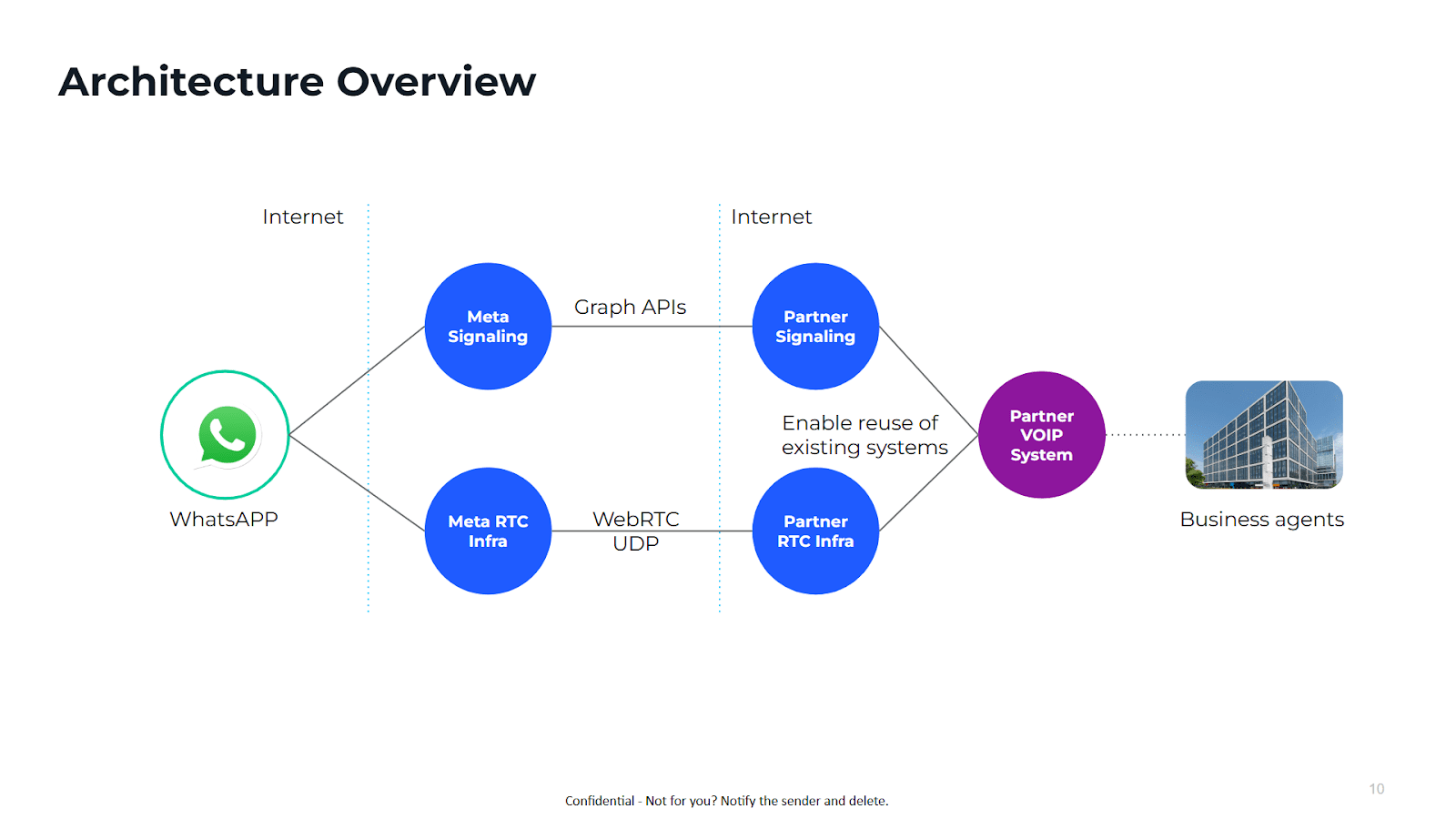
The WhatsApp voice architecture is designed to marry WhatsApp’s messaging layer with real-time media plumbing.
The usual architecture includes three broad components:
a. Meta RTC layer (Real-Time Communication)
Meta provides the core signaling and media-routing primitives required to make calls within WhatsApp, essentially the platform-level RTC services that mediate call setup and termination.
b. Partner RTC layer (BSP / CPaaS provider)
Businesses do not directly interact with Meta’s RTC. Instead, they integrate with a Business Solution Provider (BSP) such as Route Mobile.
This partner layer provides:
- REST APIs to initiate or receive calls
- Webhooks to deliver call events to your backend
- Media relays and routing logic
- Contact centre integrations
- Compliance handling (opt-in management, template approvals)
- Regional hosting and local regulatory alignment
Without this partner layer, an enterprise cannot reliably operate WhatsApp voice at scale.
c. WebRTC (client-side media stack)
On the business side, calls usually land on:
- Browser-based agent dashboards using WebRTC
- Native mobile agent apps
- Contact centre platforms integrated through SIP/WebRTC bridges
This endpoint handles:
- Audio capture/playback
- Device permissions
- Call controls (mute, hold, end)
- Reading contextual data (chat history, customer metadata)
Together, these three layers complete the full cycle of a voice call.
2. What happens when a call is made
a. Customer-initiated call flow
Here’s the entire cycle that happens within seconds, giving customers a seamless, trusted experience:
- The customer taps the call button in the WhatsApp chat screen.
- WhatsApp client triggers Meta RTC, sending a request to establish a call session.
- Meta validates permissions, such as whether the business is approved for calling and whether the user has opted in.
- Meta notifies the BSP, passing session identifiers and call metadata.
- BSP routes the call to the appropriate agent or department based on your routing logic.
- The agent receives the incoming call on a WebRTC client with the whole chat context.
- Call connects, and RTP-like audio streams begin.
- Call events (ringing, answering, ending, duration) are sent to your backend through webhooks.
b. Business-initiated call flow
Since business-initiated calls come with strict permission rules, opt-in and compliance checks naturally appear as part of the technical flow.
- Business triggers a call request using the WhatsApp voice api (through the BSP).
- Meta checks for user opt-in to ensure compliance.
- WhatsApp shows an incoming call screen with a verified business badge.
- User accepts, and the call starts.
- All call events are passed to your backend for analytics and monitoring.
3. Permission and compliance
In the WhatsApp ecosystem, compliance isn’t optional but foundational. This is why the platform checks permissions during the call flow itself.
Here are the key elements it includes:
a. User opt-in
Before you initiate a call, a user must have explicitly opted in. Opt-in may be collected through:
- A WhatsApp message
- A website form
- An app setting
- A physical form
Your BSP helps log and verify these records.
b. Business verification
Meta requires businesses to complete verification before they can use advanced capabilities like calling.
c. Approved templates (for certain outbound flows)
If you trigger a call using a message template (e.g., “Tap to Call”), that template must be approved by WhatsApp.
d. Recording & data handling
If your business records calls:
- You must disclose it to the user
- Consent must be captured
- Storage and retention must follow regional rules
These permissions aren’t separate from the technology but are enforced within the call setup process.
Top features of WhatsApp Business calling API
The WhatsApp Business calling API is built to extend messaging into real-time voice while maintaining WhatsApp’s familiar interface.
Each feature is designed to reduce friction, improve clarity, and keep conversations contextual from start to finish.
1. In-thread voice escalation
Customers never leave the chat window. A voice call launches directly inside the conversation, allowing:
- Quick resolution for complex queries
- Continuity between chat, images, videos, and voice
- Agents are to see the full message history before answering
2. Business-initiated & customer-initiated calling
Brands can place calls to opted-in users or receive incoming calls initiated by customers. Both follow WhatsApp’s identity and permission rules to ensure trust and compliance.
3. Verified caller identity
Calls display the business’s verified name and badge. This eliminates the anonymity of unknown phone numbers and increases answer rates, especially for industries where credibility is crucial.
4. Context transfer and metadata
WhatsApp voice API passes conversation context such as recent messages, customer identifiers, and previous agent interactions to the voice session, helping agents respond faster and accurately.
5. WebRTC-based agent interface
Agents handle calls through secure WebRTC clients, reducing reliance on traditional telephony. This enables:
- Browser-based calling
- Consistent global audio quality
- Easier integration with contact centre dashboards
6. Lifecycle events and analytics
Developers get webhook events for ringing, answered, ended, and call failures. These events power:
- Real-time monitoring
- Performance dashboards
- Automated workflows and escalations
What advantage does Route Mobile have?
As a long-standing Meta Business Solution Provider (BSP), Route Mobile plays a critical role in making WhatsApp Business Calling enterprise-ready. Bringing decades of CPaaS experience across messaging, voice, and customer engagement, makes Route Mobile one of the most mature partners for enterprise-grade WhatsApp Voice deployments.
Its infrastructure and API framework help brands adopt calling faster and integrate it deeply with their communication stack.
1. Enterprise-grade infrastructure
Route Mobile hosts distributed points of presence and optimized media relays to maintain stable, low-latency voice quality across diverse networks and regions.
2. End-to-end onboarding
From business verification to number onboarding, template submissions, and opt-in best practices, Route Mobile guides enterprises through Meta’s compliance processes.
3. API-first architecture
Its developer-friendly APIs simplify how teams trigger voice calls, receive events, route traffic, and manage session control. Integrations plug easily into existing CRMs, support desks, and contact centres.
4. WebRTC agent framework
Route Mobile provides ready-to-use WebRTC agent clients or SDKs that reduce development time and ensure consistent audio behavior across browsers and devices.
5. Unified analytics
Brands get a single view of messaging and calling metrics, including call quality, answer rates, and workflow performance, enabling data-driven optimisation. Advanced dashboards provide quality metrics, call outcomes, and workflow insights across every touchpoint.
6. Global regulatory knowledge
Compliance requirements differ by market. Route Mobile helps companies navigate data localisation, recording rules, and telecom regulations when deploying WhatsApp Business API voice calling capability across multiple regions.
7. Omnichannel integration
WhatsApp Voice integrates seamlessly within Route Mobile’s broader omnichannel communication stack, unifying messaging, email, voice, and CRM workflows. Brands can orchestrate consistent, contextual customer experiences across every touchpoint.
Practical use cases of WhatsApp Business API voice
The strength of WhatsApp voice lies in real-world scenarios where text alone cannot deliver clarity, reassurance, or timely assistance.
Here are the most common and high-impact practical use cases businesses primarily leverage WhatsApp voice API for:
1. Customer support escalation
When troubleshooting becomes complex, like assembling a product, verifying a process,or clarifying instructions, agents can escalate right away to voice inside the same thread.
2. High-value sales and assisted buying
For high‑consideration sectors such as banking, insurance, automotive, appliances, education, and real estate, human guidance remains essential to driving conversions. WhatsApp Voice makes this easy by enabling instant, high‑touch sales conversations the moment a customer shows intent, delivering reassurance and personalised support exactly when it matters most.
3. Identity and security verification
Banks, fintechs, and e-commerce platforms use live voice confirmations for sensitive actions such as refunds, approvals, or order modifications.
4. Logistics coordination
Delivery partners and customers use voice for quick clarifications about timing, access points, or special handling, eliminating repeated failed attempts.
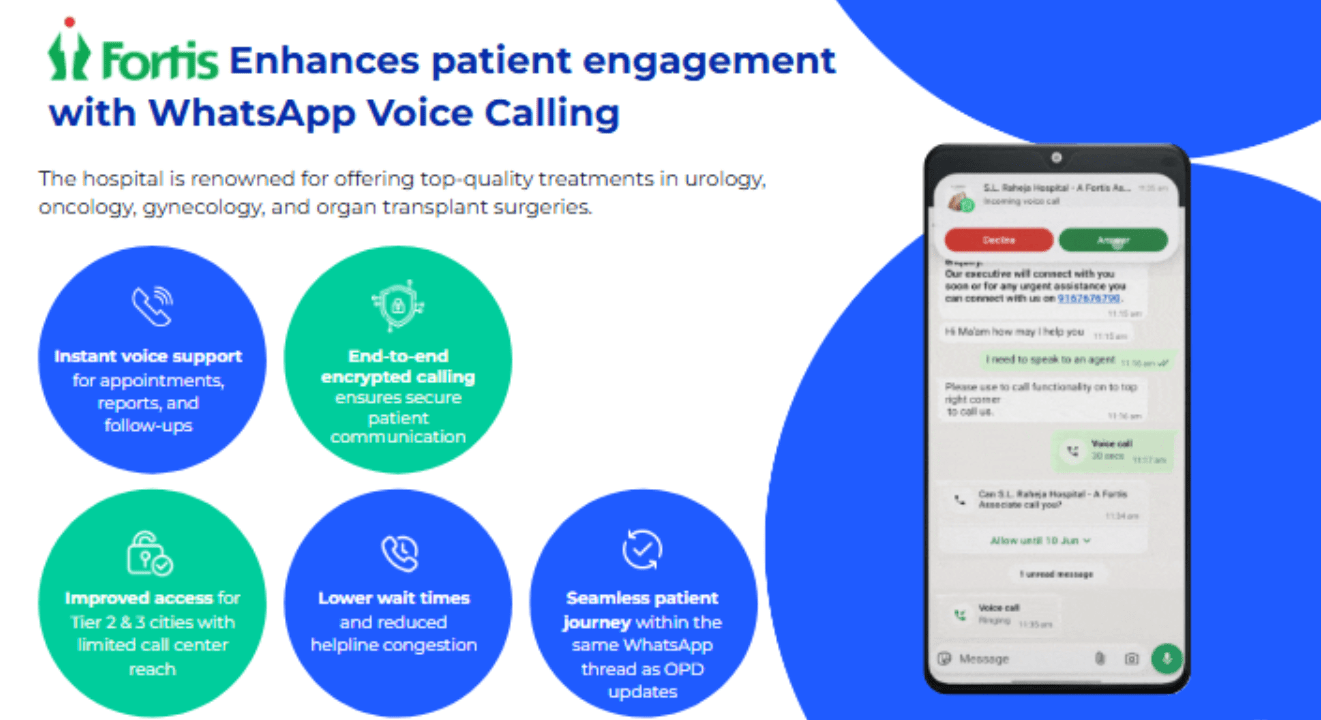
5. Healthcare
In healthcare, speed and reassurance are as critical as accuracy. While messaging for updates and reminders, patient interactions still need a human voice.
This is especially true when anxiety, urgency, or complex instructions are involved. WhatsApp Voice allows healthcare providers to move from digital convenience to real-time care without breaking context or trust.
Hospitals and care providers can use encrypted, in-app voice calls. It will help to reduce call-center congestion, improve patient reachability, and ensure sensitive conversations happen on a verified, secure channel.
Fortis Healthcare testimony
“Route Mobile played a crucial role in transforming our operations at Fortis Hospitals throughout India. Their innovative WhatsApp services allowed us to effortlessly switch from paper-based to paperless operations. They’ve done that by sending all our OPD invoices through WhatsApp. This swift conversion of our data from physical documents to digital files. It substantially improved our efficiency and customer experience. “
Fortis Healthcare
Practical healthcare workflows enabled with WhatsApp Voice features:
- Appointment confirmation, rescheduling, and pre-visit instructions
- Chronic care coordination and patient support calls
- Post-consultation follow-ups and care guidance
- Faster resolution of missed calls compared to traditional IVR systems
- Sensitive conversations require empathy and reassurance
6. Appointment and service workflows
Healthcare providers, clinics, and service centres can confirm bookings or provide pre-visit instructions through contextual voice calls.
7. Premium customer experiences
Concierge teams, travel consultants, and luxury brands use voice to provide tailored recommendations, ensuring customers feel valued and supported.
Getting started with WhatsApp Business calling
Here’s a step-by-step process to get started with WhatsApp Business calling:
Step 1: Complete Meta Business verification
Voice features unlock only after Meta verifies your business. This confirms your identity and enables advanced API capabilities like calling through the WhatsApp Business calling API.
Step 2: Get on board with a BSP
You should always prefer to choose a Meta-approved BSP such as Route Mobile that provisions your WhatsApp setup, manages compliance, and provides the APIs, SDKs, and WebRTC tools required for calling.
This partnership is essential for using the WhatsApp voice API at scale.
Step 3: Set up opt-in flows
For business-initiated calls, users must explicitly consent. You can capture opt-ins through WhatsApp messages, app/website forms, or offline channels.
Your system should securely store these records to meet WhatsApp’s permission requirements.
Step 4: Integrate APIs and webhooks
Your backend connects to the BSP’s API layer to:
- Trigger calls
- Receive call lifecycle events
- Pass the customer context to the agent interface
This integration enables the reliable use of the WhatsApp Business API voice call capability.
Step 5: Deploy WebRTC agent clients
Agents need a simple, stable interface to answer calls, view chat history, and manage conversations.
You can use a BSP-provided WebRTC client or embed call controls into your existing support or sales dashboard.
Step 6: Configure routing
Define how calls are distributed, by department, expertise, language, business hours, or automation rules. Good routing ensures customers reach the right person quickly.
You may configure logic such as:
- Skills-based routing (languages, expertise)
- Priority queues
- Department-based routing
- Business-hours or region-based workflows
- Bot-to-human handover rules
Step 7: Test voice quality
Before going live, test calling across different networks, devices, and regions. Also test voice behaviour across various conditions:
- Fast and slow networks
- Android and iOS devices
- Urban and rural regions
- Different browsers or agent systems
You should check for latency, jitter, packet loss, handling in poor network conditions, and how your routing reacts to failures or timeouts.
This helps ensure a smooth WhatsApp VoIP experience and identifies issues early.
Step 8: Launch a controlled pilot and optimise
Start with one or two use cases, measure performance, refine workflows, then scale gradually.
Key metrics to monitor include:
- Answer and completion rates
- Resolution time and handle time
- CSAT changes
- Call quality performance
- Conversion improvements
FAQ
Is PSTN supported?
Yes, BSPs can provide optional PSTN bridging, but it adds cost and introduces telecom-level compliance. Many enterprises prefer pure in-app voice when both parties are on WhatsApp.
How does billing work?
Most BSPs bill by voice per minute. There may be additional charges for PSTN bridging or premium routing. Consider the total cost of ownership, including contact centre changes.
What countries are supported?
Meta’s platform rollouts vary by region. BSPs like Route Mobile provide region-specific coverage and will document supported markets and local requirements.
How to manage call permissions?
You must follow Meta’s opt-in rules, such as collecting explicit consent to receive calls, logging consent records, and exposing unsubscribe/opt-out flows where required.
Do calls use end-to-end encryption?
WhatsApp maintains strong protections. However, call recording and analytics implemented on BSP or agent side may change data handling — make sure you disclose and manage consent.
Future roadmap for WhatsApp calling
WhatsApp continues to upgrade its calling ecosystem, with several improvements expected to shape the next wave of customer communication.
- Richer voice with chat experiences: Expect deeper integration between voice calls and in-thread actions — including post-call notes, automated summaries, and contextual suggestions.
- Smarter Bot-to-Voice escalation: AI-driven bots will hand over calls more intelligently, reducing misroutes and improving resolution rates.
- Better developer tooling: More advanced SDKs, clearer documentation, and tighter WebRTC support will streamline enterprise adoption.
- Advanced compliance tools: WhatsApp and BSPs will roll out stronger mechanisms for consent tracking, data retention control, and auditability.
- Enhanced quality monitoring: Businesses will gain additional visibility into call quality metrics, enabling precise optimisation for global audiences.
Conclusion
WhatsApp Business calling is becoming a core part of modern customer engagement, bridging the gap between fast messaging and the clarity of human voice.
With the WhatsApp Business Calling API and WhatsApp Voice API, businesses can handle support, sales, and verification within a trusted, familiar platform without forcing customers into fragmented channels.
When paired with a capable BSP like Route Mobile, enterprises gain the reliability, compliance support, routing intelligence, and developer tools needed to scale voice communication effortlessly.
Whether the goal is faster resolutions, higher conversions, better customer trust, or cohesive omnichannel journeys, WhatsApp voice delivers a meaningful competitive advantage.
We at Route Mobile, a leading business services provider, offer WhatsApp API solutions, advanced technological infrastructure, and exceptional customer support. Contact our experts today to get started!